 Aura · WhatsApp for business
WhatsApp is the number one channel for customer engagement.
Build your customer experience with Aura, the best WhatsApp for Business agent.
Try it opens a live project’s WhatsApp. Say hi and use it the way a buyer would.
Your buyers message you at eleven at night. Aura answers every one of them.
With your project’s facts, the plans they asked for and a button for the next step. The chat then stays with them all the way to the site visit.
Say hi on WhatsApp
Who uses Aura, and what for.
What each of them tells us, and what Aura does about it.
“I asked for the floor plan at eleven at night. I didn’t want a call back tomorrow.”
The floor plan arrives as a PDF, right then. So do the brochure, the master plan and the walkthrough.
“I’m on a site visit. I can’t answer twenty chats.”
Aura answers while you’re busy. One switch in ClikWork and the chat is yours until you hand it back.
“Half our WhatsApp chats never reach the lead record.”
Every message, from the buyer, the RM or Aura, sits on the lead. A buyer who asks for a visit goes to the top of the desk’s queue.
“The bot must never quote a price we didn’t approve.”
Aura quotes price ranges from your price card. It never gives a unit’s price, a discount or a promised return.
How a buyer moves from hello to site visit.
One buyer’s week, day by day, all in one chat. Each screen is what the buyer sees.
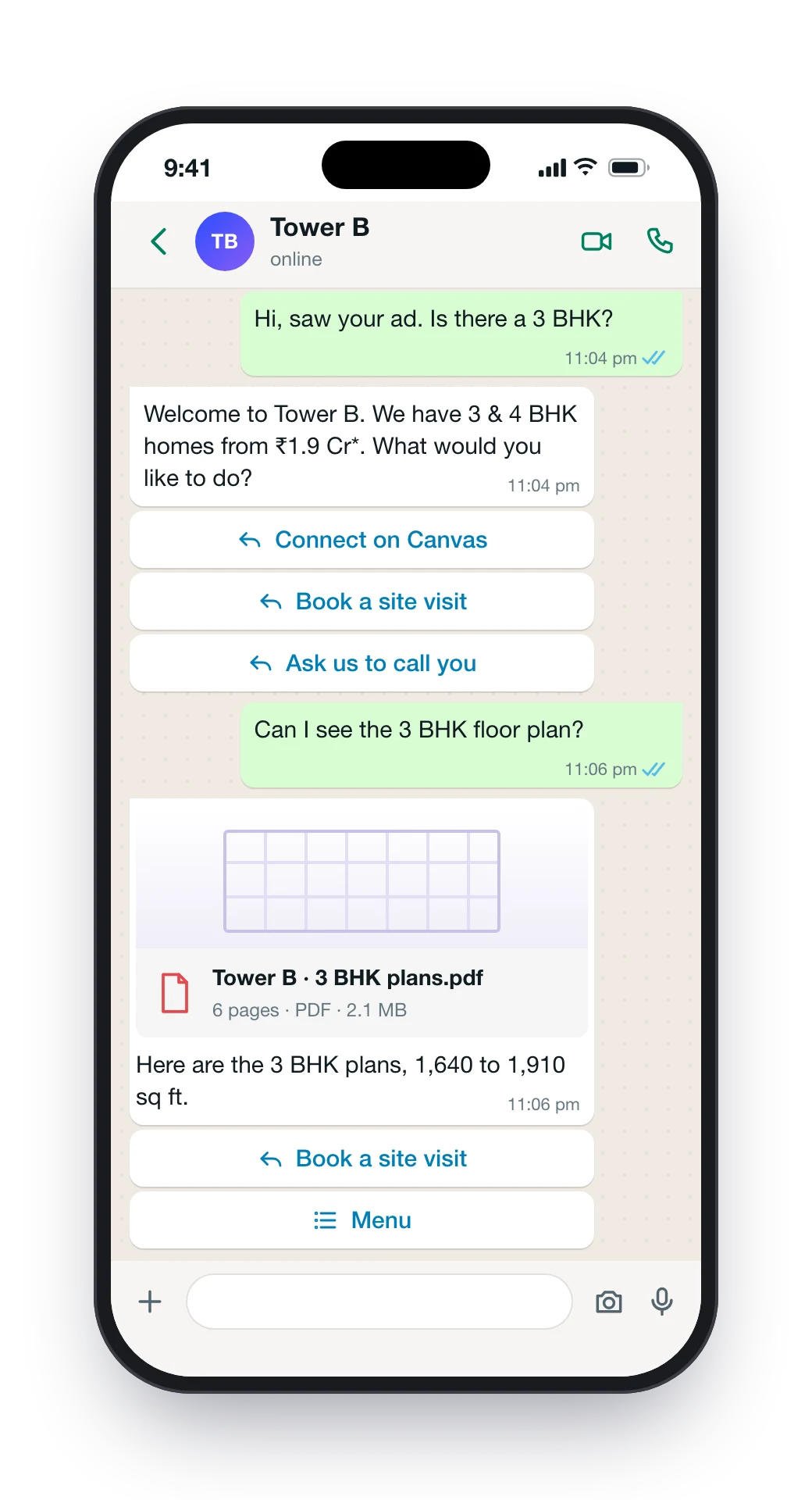
They say hi. Aura answers.
In seconds, at any hour, in English, Hindi or Kannada. The answer comes from your approved project facts, and the floor plan they asked for arrives as the real PDF.
- Three buttons on every reply
- Typing “menu” opens all ten options
- Complaints, discounts and legal questions go to a person
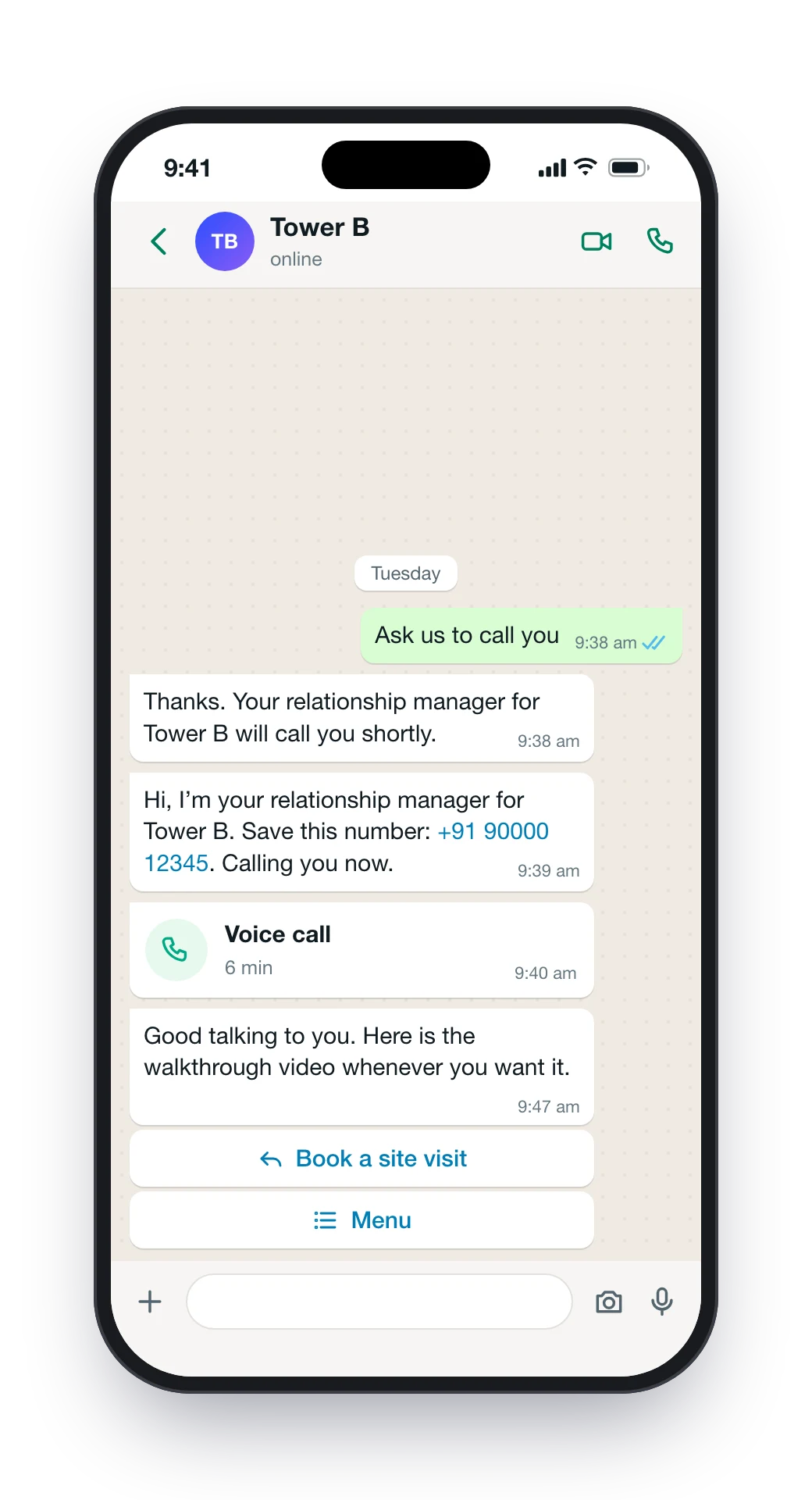
A call when they want one.
“Ask us to call you” makes them a lead and puts them at the top of the desk’s queue. Aura introduces their RM with a number to save, and the RM calls. They can call on WhatsApp too.

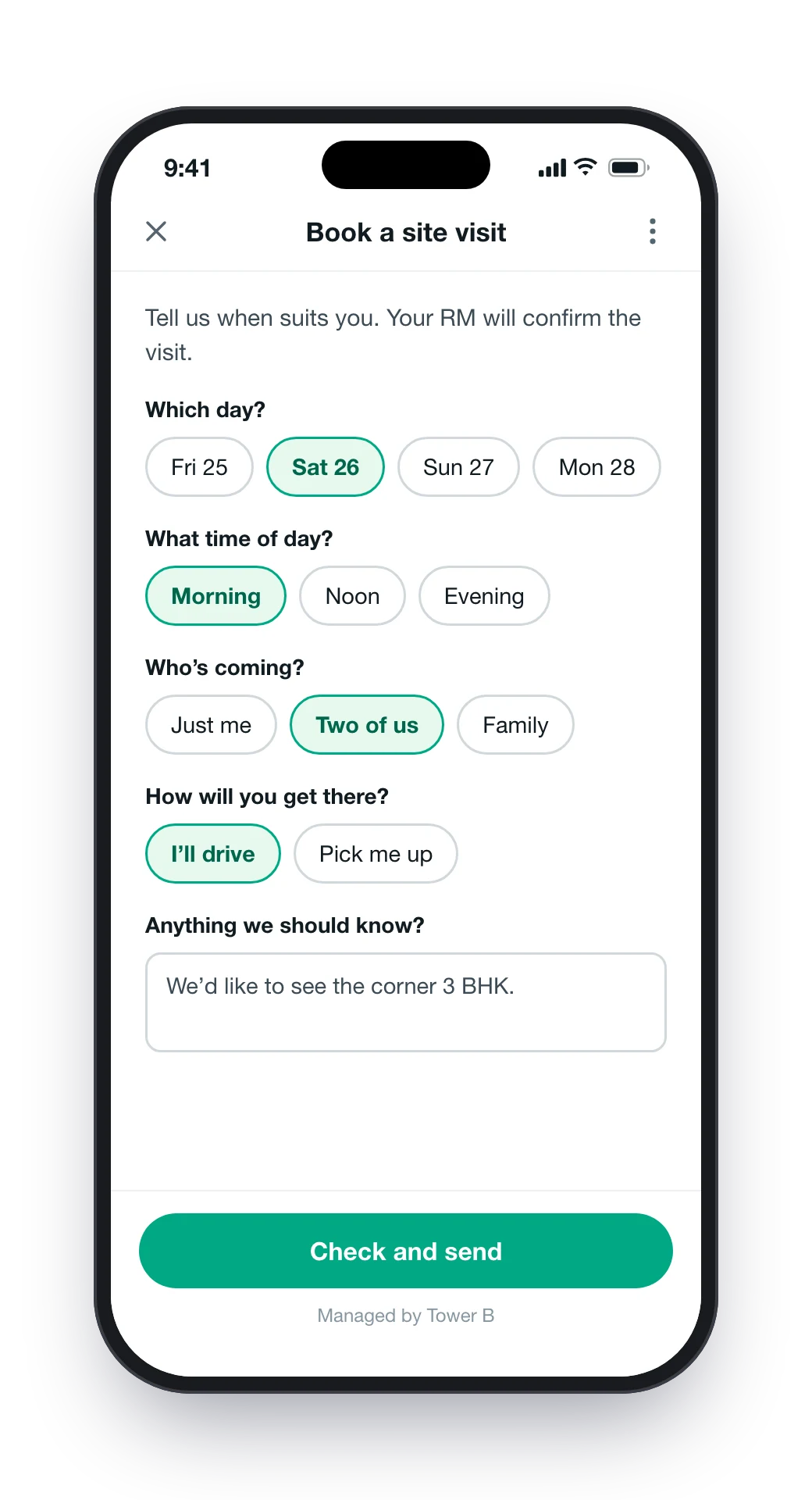
A site visit in a few taps.
One screen inside WhatsApp asks for the day, the part of the day, who’s coming, and whether they’ll drive or want a pickup. The request goes to the RM, who confirms it.
- Morning, noon or evening, so nobody waits for a promised minute
- The RM sees the request at once
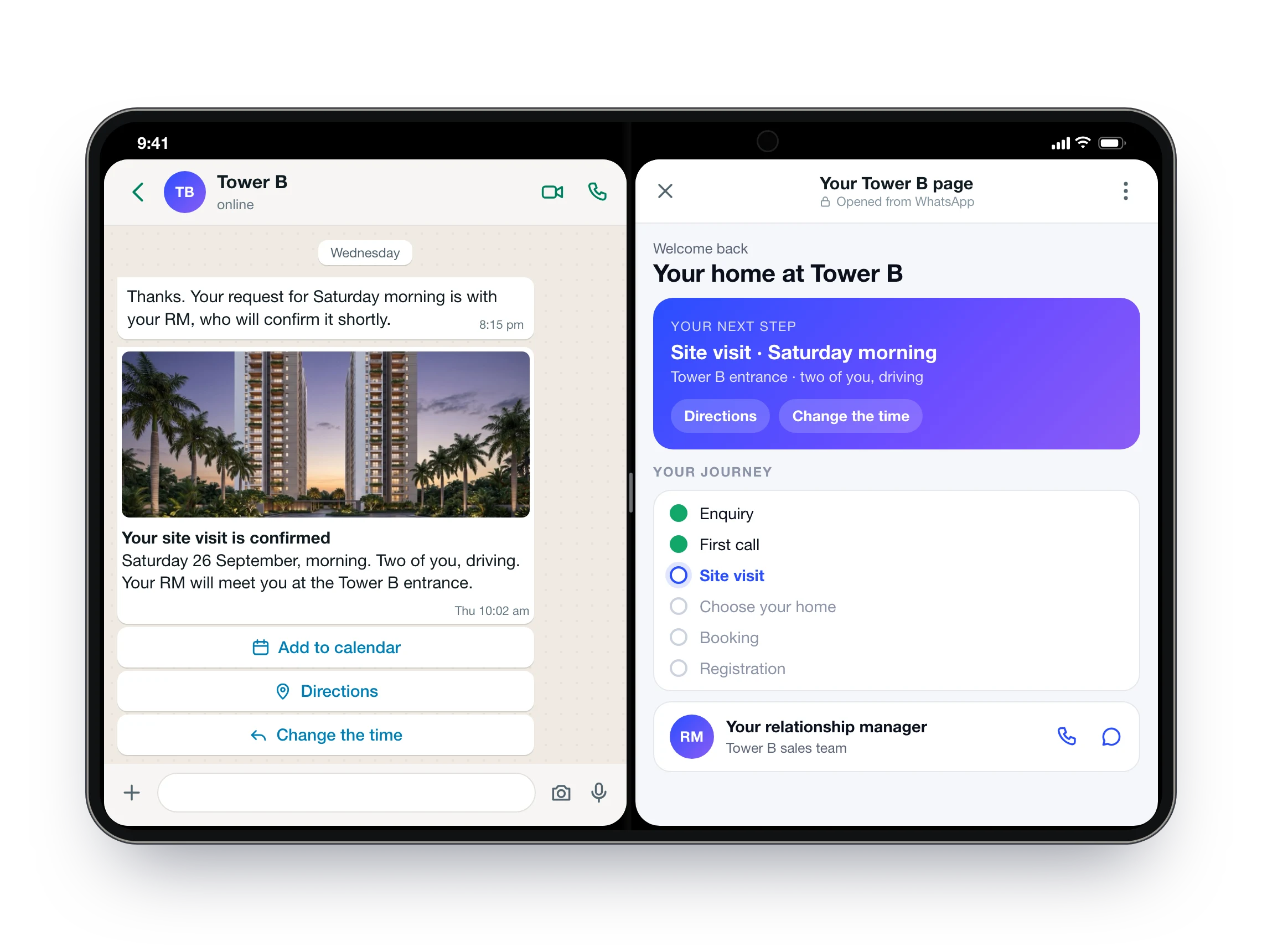
Confirmed, and their own page beside it.
Add to calendar, Directions and Change the time sit on the message, with a reminder the day before and two hours before. “View my page” opens their journey, next step and RM. No password, and no code on their own phone.
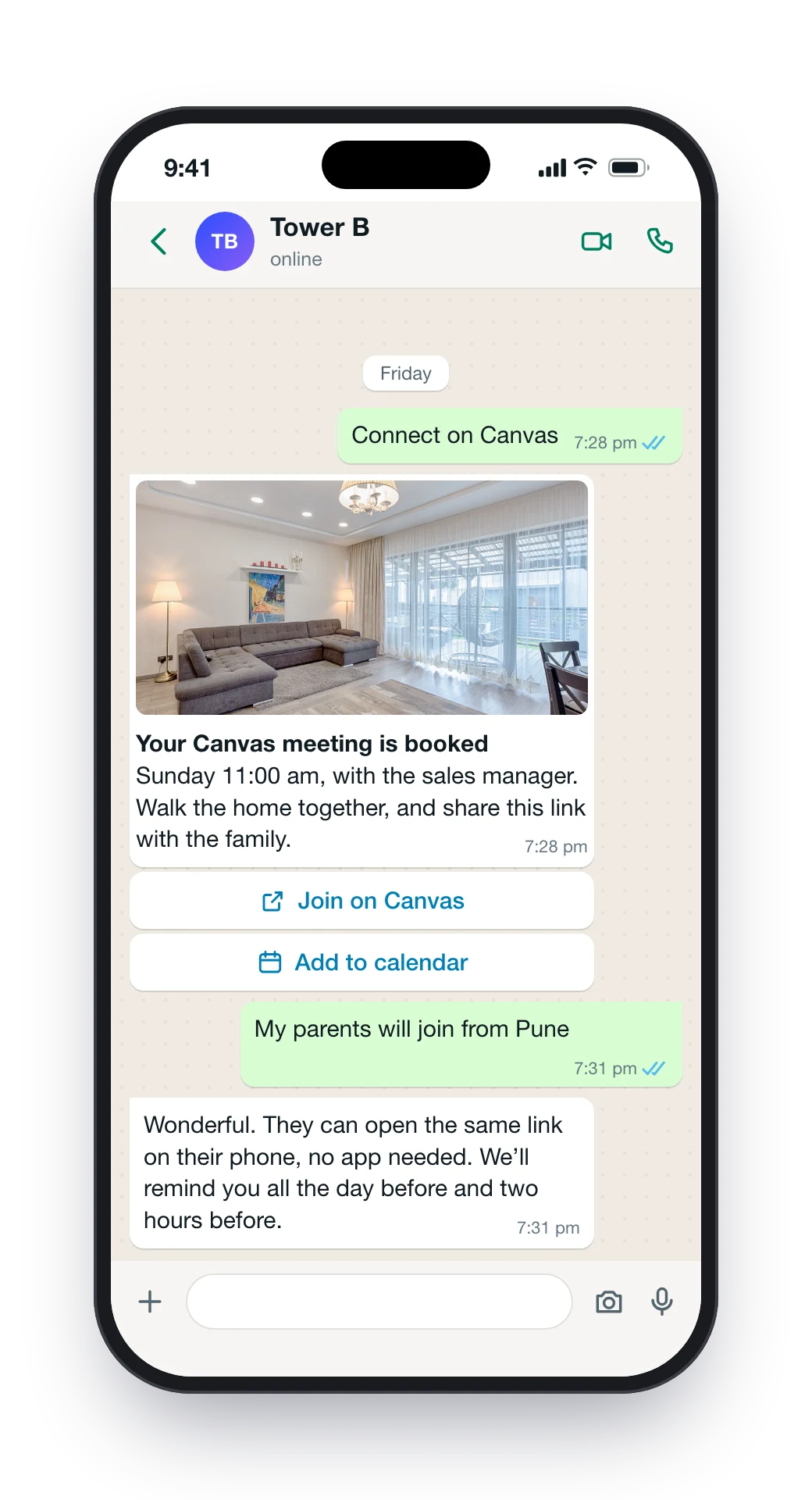
Family far away? Connect on Canvas.
The parents can walk the home from their own city. Their Canvas link arrives in the chat with its reminders, and a recap follows within a minute of the Canvas meeting ending.
- No app to install
- “My meeting” shows the Canvas meeting and the site visit together

Saturday, morning · Directions
Your team sees the same thread.
Aura answers while your people are busy. They can take any conversation back with one switch.
- A new lead, on the RM’s WhatsAppWho it is, where they stand, how warm they are, and a note.
- One switch per chat“You’re answering” in ClikWork, and Aura stays quiet until the RM hands it back.
- The RM’s replies stay in the threadThe buyer’s history stays whole, whoever wrote.
- A read on every chatIntent, mood, hot, warm or cold, urgency and buying stage.
- Marked-up plans, sent in the chatThe RM draws on a PDF and sends it to the buyer.
Can we bring my parents on Saturday?
Of course. I’ll keep the model flat open for them. Shall I arrange a pickup?
Yes please, 10:30.
The rules every chat follows.
Written down once, and kept with every buyer.
When Aura writes first, it writes in these hours, at most once a day.
One line to confirm, then nothing from anyone: Aura, the RM or a campaign.
The buyer gets 30 quiet days. Any message from them opens the chat again.
Each message goes out once. Two quick messages from the buyer get one answer.
An old message is never answered as if it just came in.
No unit price, RERA number, discount or promised return is ever made up.
What Aura does for each person.
Aura works on your own WhatsApp Business number, and every message lands on the lead in Helix and ClikWork.
Answers at any hour, the brochure and floor plans, a site visit in a few taps, a call back or a WhatsApp call, their own page and Canvas meetings.
New leads on the RM’s WhatsApp, a switch to take any chat, the whole thread on the lead, and a read on every conversation.
A campaign opener, a nudge at 48 hours and one at five days, then silence. Template approval is checked before each send, and STOP is honoured across everything.
What builders ask about Aura.
Does Aura use our own WhatsApp number?
Can our RM take over a conversation?
What does Aura say about price?
Does Aura book the site visit?
Which languages does Aura answer in?
What happens when a buyer says STOP?
How much does it cost?
Try Aura on a live project.
Say hi on a live project’s WhatsApp and use it the way a buyer would. Then we set it up on your number, with your projects and your team.