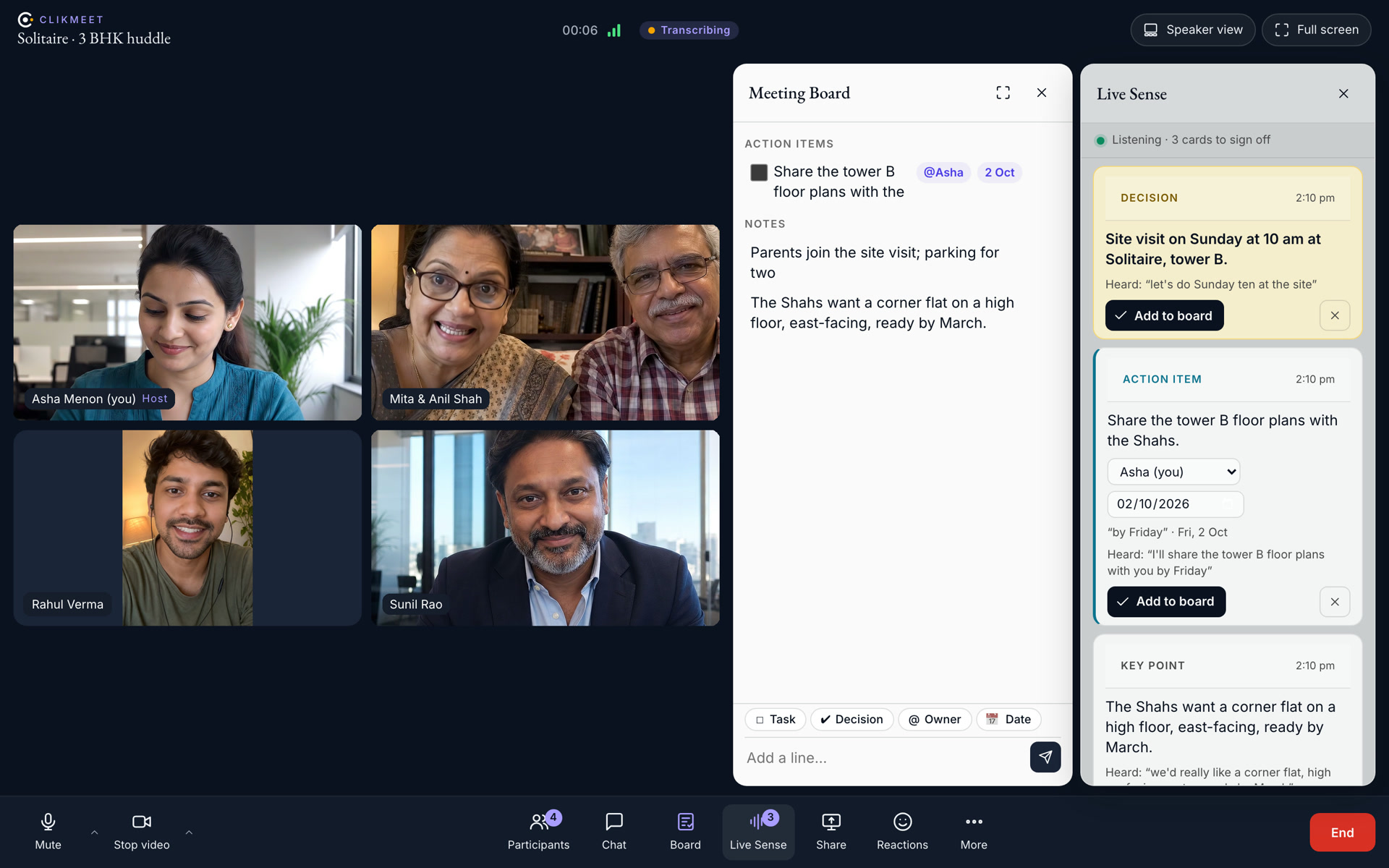
Live Sense listens and writes the key points, action items and decisions. You tap to put them on the shared Meeting Board. Guests join from one link, no app. Everyone gets the notes when the call ends.
Sample people and a sample call throughout. Nothing here is a customer’s.
36 seconds of a call. The Shahs say what they want. Asha promises it by Friday. Live Sense writes both down, and Asha adds them to the board.
1 linkPer meetingColleagues sign in and walk in. Guests knock; the host admits.
0Apps to installOpens in the browser on a laptop or a phone.
~15 sFrom words to a cardLive Sense reads the call in near real time.
100%Of calls written upTranscript, summary, decisions and action items to everyone.
Why we built our own
A sales meeting is only as good as what survives it.
The buyer says the parents will visit on Sunday. The RM promises the price sheet by Friday. The team agrees on the twelfth-floor corner unit. By evening, each of them remembers it differently.
ClikMeet listens and writes as you talk. The whole room sees one board. Every decision is on it when the call ends.
Built from CanvasCanvas tours homes with buyers. ClikMeet brings the same room to your team, customers and partners.
Your only meeting appClikWork puts a ClikMeet link in every invite you send.
Runs in IndiaClikMeet listens and writes in Mumbai. Your call never leaves India.
Yours to switchThe host turns transcription and recording on or off. Everyone sees when they are on.
Live Sense
It hears the call, and puts up what matters.
As you talk, Live Sense writes cards beside the video: key points, action items with an owner and a date, and decisions. Each card shows the words it heard. You add it, edit it or dismiss it.
Three kinds of card. A decision. An action item for Asha, with her date. A key point: the Shahs’ wish list.
Live
A name and a date
Asha says “I’ll share them by Friday.” Live Sense assigns it to her for Friday. She says “make that Monday,” and it moves the date.
Live
One tap to the board
You tap Add to board. Edit the words, owner or date first if you need to.
Live
Everyone sees, the team signs
Guests see the same cards. Only your team adds or dismisses them.
EnglishHindiHinglishA change of mind moves the cardNothing inventedNever the camera or the mic
The Meeting Board
The plan on screen while it is made.
Everyone in the call sees one board and writes on it, from a laptop or a phone. Decisions sit at the top. Action items carry an owner and a date.
Type it, or say itType a line and press Enter, or add what Live Sense heard.
Live for everyoneTwo people can edit one note at once. Late joiners see the whole board.
On a phone, a sheetSwipe the board up. Faces shrink to a strip; the mic stays a tap away.
Becomes the recapThe summary starts with what is on the board.
AI assist
Before, during and after the call.
The AI Brain that answers your buyers and coaches your calling desk joins your meetings too.
TranscriptWho said whatEvery language
DuringThe scribe
The scribe writes who said what, in English, Hindi or Hinglish. The host can stop it any time.
Key pointsAction itemsDecisionsAdd to board
DuringLive Sense
Live Sense keeps a short list of cards and updates them when plans change. It never invents a name, date or fact.
One-time setup, then a success fee per bookingThe same terms as the rest of the system. Nothing extra for meetings.
Unlimited meetingsNo minutes to count, no host licences to buy.
Your data, your switchYou own your transcripts and recordings, and delete them when you choose.
What teams ask
Questions teams ask, and the answers.
Do guests need an account or an app?
No. Guests open the link in a browser, type a name and knock. The host lets them in.
Does Live Sense show the customer what my team says?
Yes, guests see the same cards, read-only. Only your team adds or dismisses them. The host can switch transcription off at any moment.
Which languages does it understand?
English, Hindi and Hinglish. Live Sense writes its cards in plain English.
What if it hears something wrong?
Each card shows the words it heard. You edit or dismiss it. Nothing reaches the board until someone taps.
Where does the recording and the transcript go?
Invitees get the transcript and summary by e-mail; ClikWork keeps them on the meeting. The organiser gets the recording as a private link. Clikin stores both in India and deletes them when you ask.
Can it be our only meeting app?
Yes. Clikin runs its own meetings on it. ClikWork puts a ClikMeet link in every invite, and Meet Now starts a huddle from a lead’s card.
How many people can join?
Up to sixteen people per room today.
Have your next meeting write itself down.
Bring your team and a guest to a twenty-minute call. Watch the board fill.
Nova is the voice we build — the one that answers calls for our customers’ buyers. Right now she answers for us. Same brief, different voices: hear them side by side.
 ClikMeet · video meetings by Clikin